Automatic Format Detection
When you open a log file, Logfile Expert automatically analyzes the first few lines to detect the format. This works seamlessly for all built-in formats.
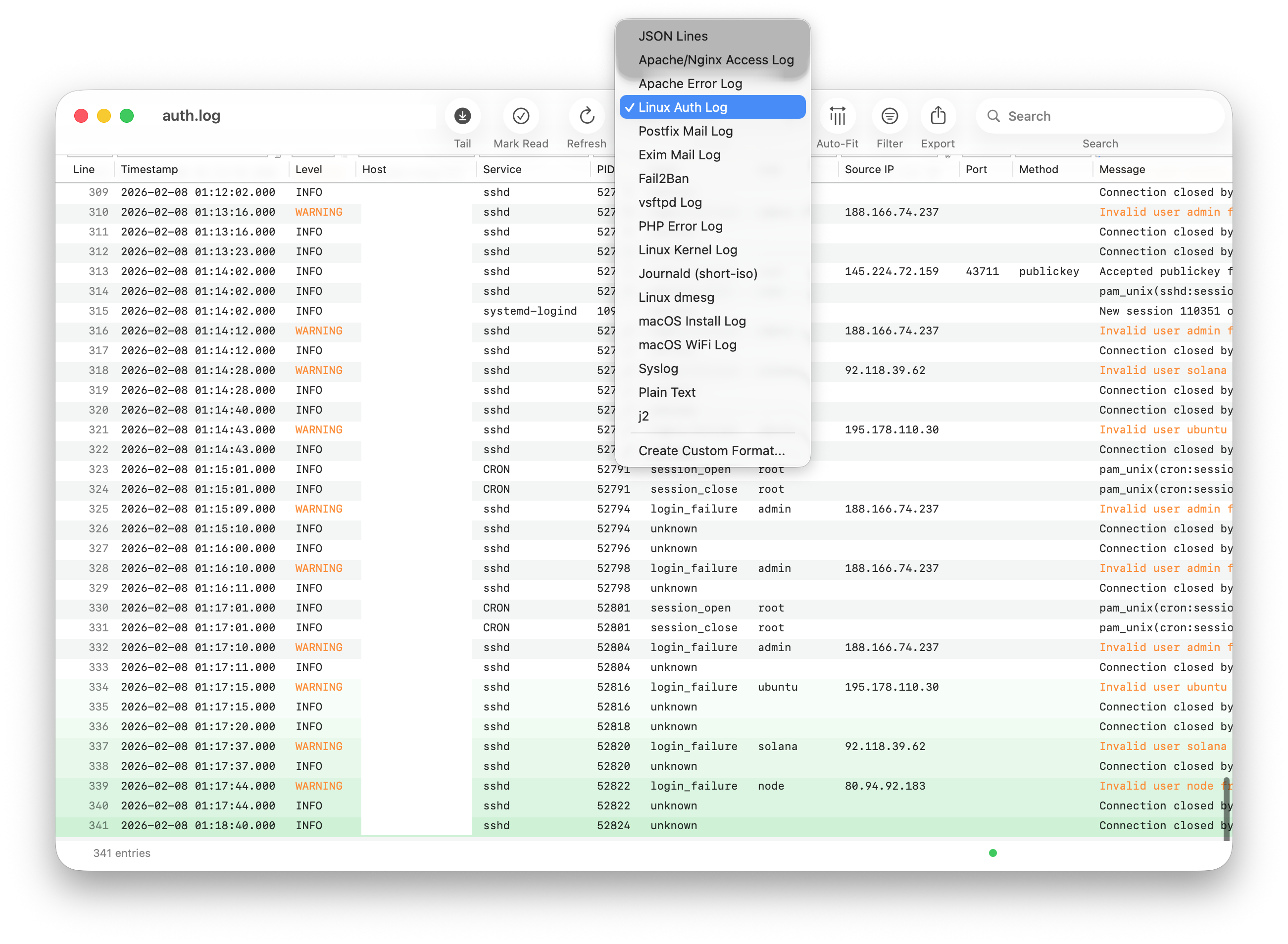
If automatic detection fails or selects the wrong format, you can manually select a format from the Format dropdown in the toolbar.
Web Server Logs
Apache/nginx Access Logs
Supports Apache and nginx access logs in Common Log Format (CLF) and Combined Log Format.
Example (Combined Log Format):
Parsed Fields:
- IP Address
- Timestamp
- HTTP Method
- Request Path
- HTTP Version
- Status Code
- Response Size
- Referrer
- User Agent
Apache Error Logs
Parses Apache error log entries with severity levels and module information.
Example:
Parsed Fields:
- Timestamp
- Module
- Log Level
- Process ID
- Client IP
- Message
System Logs
Syslog
Standard syslog format used by most Linux distributions.
Example:
Parsed Fields: Timestamp, Hostname, Process Name, PID, Message
Linux Auth Log
Authentication and authorization events on Linux systems. Parsed with the same structure as syslog, with additional extraction of event type, user, source IP, port, and authentication method.
Example:
Linux Kernel Log
Kernel messages from /var/log/kern.log.
Example:
Linux dmesg
Kernel ring buffer messages.
Example:
Journald (short-log)
Systemd journal output in short log format.
Example:
macOS Install Log
macOS installation and software update logs.
macOS WiFi Log
macOS WiFi diagnostic and connection logs.
Application Logs
JSON Lines
Each line is a valid JSON object. All JSON fields are automatically extracted into separate columns.
Example:
Postfix Mail Log
Postfix SMTP server logs.
Example:
Exim Mail Log
Exim mail transfer agent logs.
Example:
Fail2ban Log
Fail2ban intrusion prevention logs.
Example:
PHP Error Log
PHP application errors and warnings.
Example:
vsftpd Log
vsftpd FTP server transfer logs.
Example:
Plain Text
When no structured format is detected, files are displayed as plain text with line numbers. This works for any text file.
Custom Log Formats
If your log format isn't supported out of the box, you can define a custom parser. Select Create Custom Format... from the Format dropdown in the toolbar, or open Preferences → Custom Formats.
The custom format editor supports regex pattern mode and fixed-width mode, with typed columns (Timestamp, IP, Level, String) that enable specialized filters. See the Custom Formats documentation for a complete guide.
Troubleshooting Format Detection
Wrong Format Detected
If Logfile Expert selects the wrong format:
- Click the Format dropdown in the toolbar
- Manually select the correct format
- The file will be re-parsed immediately
Format Not Detected
If no format is detected:
- Check if your log file uses one of the supported formats
- Verify the file isn't corrupted or empty
- Look at the first few lines — they should match a known pattern
- Create a custom format for proprietary log formats